Incorporate ALL emails into Podio
📖 Contributed by Angela Scott
Using GlobiMail along with GlobiFlow and ProcFu, easily manage all your emails in Podio.
The goal is to get all emails into a dedicated Podio App, creating a New Item for each. Then, automatically add a Contact Relationship to the email item for easy reference of conversations. Take it a step further and even move the Email Comment to another App in a Workspace or Org.
The Podio Email App
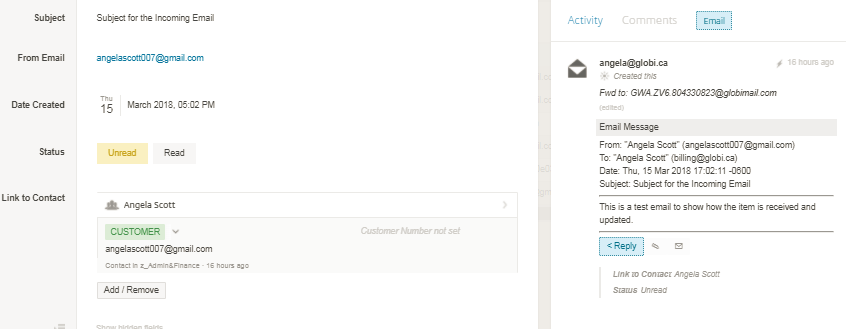
It is best to create a separate App for EACH Email Inbox.
Subject: Single Line Text, mapped in GlobiMail
From Address: Single Line Text or Email, mapped in GlobiMail
Date: Calculation field for @Created_On
Unread/Read Status: Category, unread set with GlobiMail
Customer: Relationship to Contact App, updated with GlobiFlow
Connect the App in GlobiMail
Map the Subject and From Email in GlobiMail.
The BCC Drop Box Address is needed in the next step.
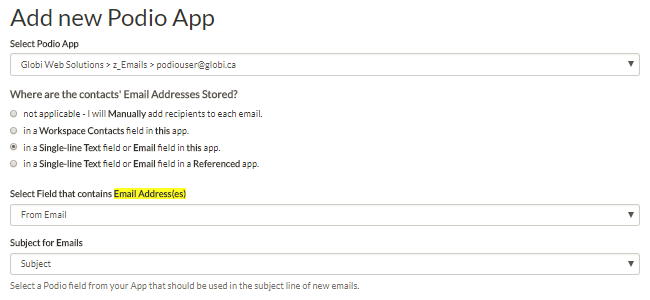
Optional Configuration Settings for handling the Email App:
Add Attachments directly to the Podio ItemAllows attachments to be easily moved from App to App, Sharefile or even Google Drive.
BCC Create Force FROM addressUsed when receiving emails from My Team members.
Then Forward Inbox to Podio
Forward to the BCC App Address by setting a rule in your Email Client.
Use the App Address with .NEW to force creation of a New Item for each email.
Now for the Automations
On each New Email Item, a GlobiFlow flow will trigger to update a Relationship to the Contact App.
GlobiMail
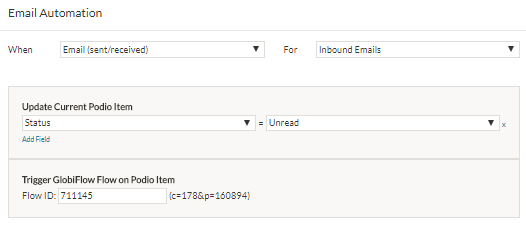
Set a GlobiMail Automation to trigger on Incoming Emails.
Add actions to Update the Status to Unread and then Trigger the GlobiFlow flow.
GlobiFlow
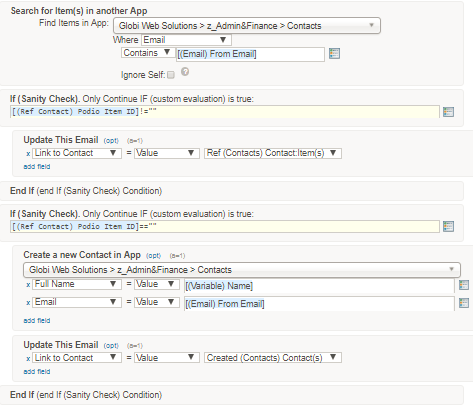
The flow is a Manual Flow, triggered in the above GlobiMail Automation.
Search Contact App for a match on the email address, if found – update collected, if not – create new.
ProcFu
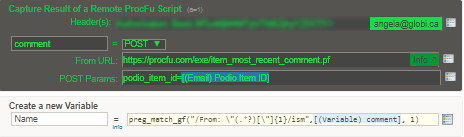
To get the From Name from the email header for the new Contact, use the Get Most Recent Comment script along with the Regex Builder in ProcFu to parse the data in a Custom Variable.
More on the Regex Builder below.
Automate even more….
A category field or similar can be used to determine any further automations.
For example, any Expense type emails should be moved to their respective Apps.
Create New Item and Move Comment
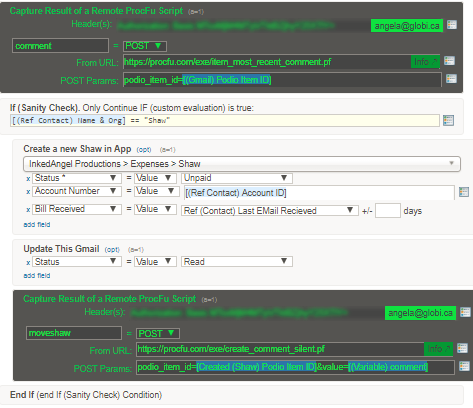
Once the contact is added to the Email Item, another flow is triggered based on the Contact Type.
This flow checks the name of the Bill and creates a new item in the Bill App, marking the Email Item Read.
The ProcFu scripts collect the most recent comment and then adds this to the created item.
Parse Email Comment
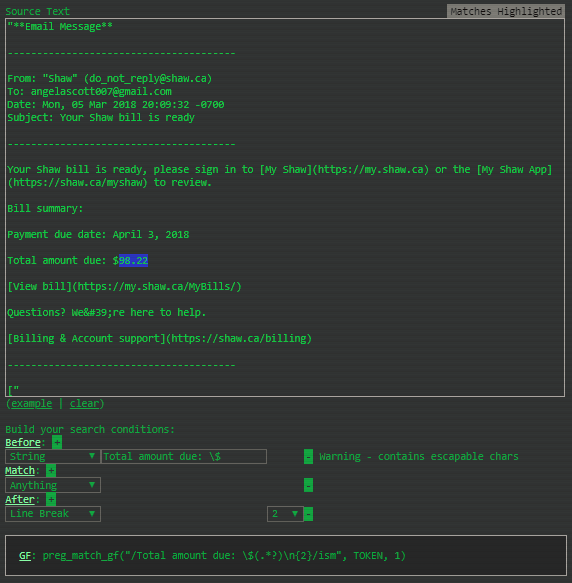
Once the expense item has been created, another flow triggers to parse out the bill data from the email.
Using the ProcFu Regex Builder, copy the email comment var into the Source Text and easily build the expressions required for the GF flow.
Results
Now, every mail item received in my Email Client is forwarded to the Email App.New Items show as Unread and can be filtered in a Podio View.When a flow moves the email to another App, it is marked as Read and removed from the View.More Contact types can determine other actions for deleting SPAM, assigning other users for follow up and more.Other Unread items can be marked Read manually once followed up on.
Gone are the days of having to check my Inbox!